How to sign a Tomorro document received by email
Electronic signatures have become an essential tool in today's digital world, allowing documents to be signed quickly and securely. Tomorro, a contract management platform, provides an intuitive solution for signing documents electronically.
Here is a step-by-step guide to signing a Tomorro document received by email.
- Receiving the Email
-
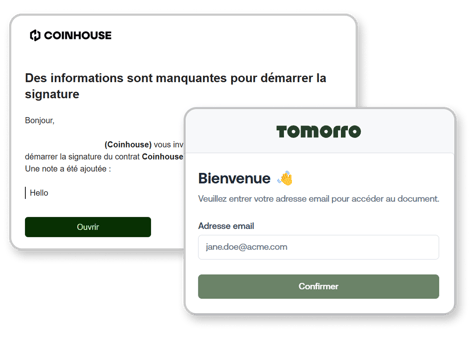
- Open the email invitation from Tomorro and click on "Open" to access the document.
- Fill in your email address field.
- A validation code will be sent to the provided email address.
- Logging into Tomorro
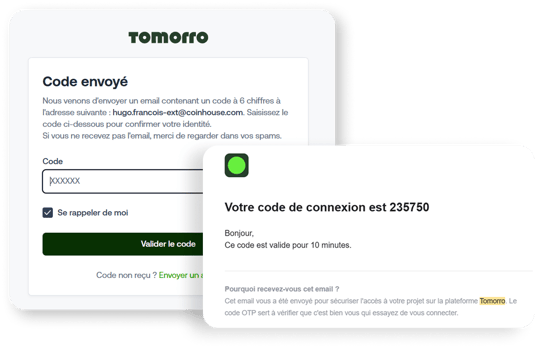
- You will be redirected to the Tomorro platform.
- Enter the validation code received in your email into the "Code" field.
- Accessing and Reviewing the Document
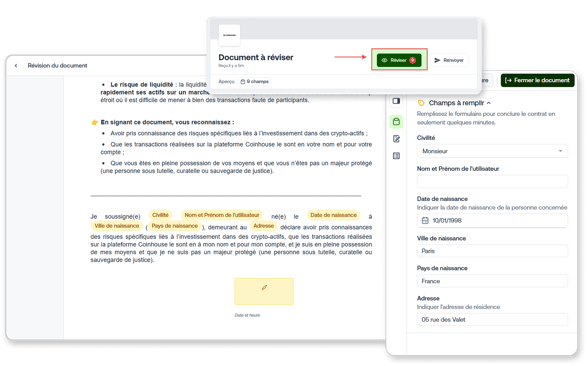
- Once logged in, review the document carefully to ensure accuracy.
- Click on "Review".
- Fill in the required details on the right sidebar (e.g., Title, Last name, First name, Date of birth).
- Signing the Document
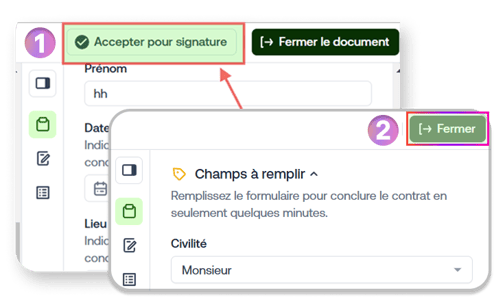
- After completing all required fields, click on "Accept for signature" at the top right of the document.
- Click on "Close".
- Confirming the Signature
- Scroll down to the bottom of the page and click on "Sign".
- You may also receive a signed copy of the document via email for your records.
- Signature Complete
- A final notification will confirm that the signature process is complete.
If you have any further questions, we are at your disposal !
Monday to Friday : from 9:30 to 12:30 and 13:30 to 18:00.
Contact us by phone 👉 +33 1 82 88 29 51